
Offline meeting transcription on a Mac requires a local speech model that is already downloaded. Offline summaries require a separate local language model. Recording audio, transcribing it, and producing notes are three stages; success at one stage does not establish the other two.
This guide uses Anarlog, the meeting notetaker we build, and includes a check you can repeat on your Mac. Documentation and screenshots are from September 22, 2026.
Check your Mac before selecting a model
Anarlog's current installers require macOS 15 or later and include Apple Silicon and Intel builds. Its built-in Soniqo, Apple Speech, and on-device file transcription options require Apple Silicon. Apple Speech has additional macOS 26 and system-asset requirements. Source: platform requirements.
Open Apple menu → About This Mac and check the chip before downloading a build or a speech model.
- Apple Silicon, macOS 15+: use the Apple Silicon build and prepare a supported local speech model. The Soniqo route below is the one used in our test.
- Intel, macOS 15+: the Intel app is available, but the built-in on-device speech paths above are not. Check an alternative provider setup or the Mac transcription options before following an offline recipe.
A compatible installer and a compatible local speech provider are separate requirements.
| Stage | Prepare while online | Check after disconnecting |
|---|---|---|
| Capture | Install the app and grant the audio permissions you need | A new recording contains the intended audio |
| Transcription | Download and select a supported local speech model | New audio produces a transcript |
| Summary | Download a local language model and configure the endpoint | A new transcript produces a summary |
| Reuse | Choose an export destination | The exported result opens locally |
Set transcription and summaries independently
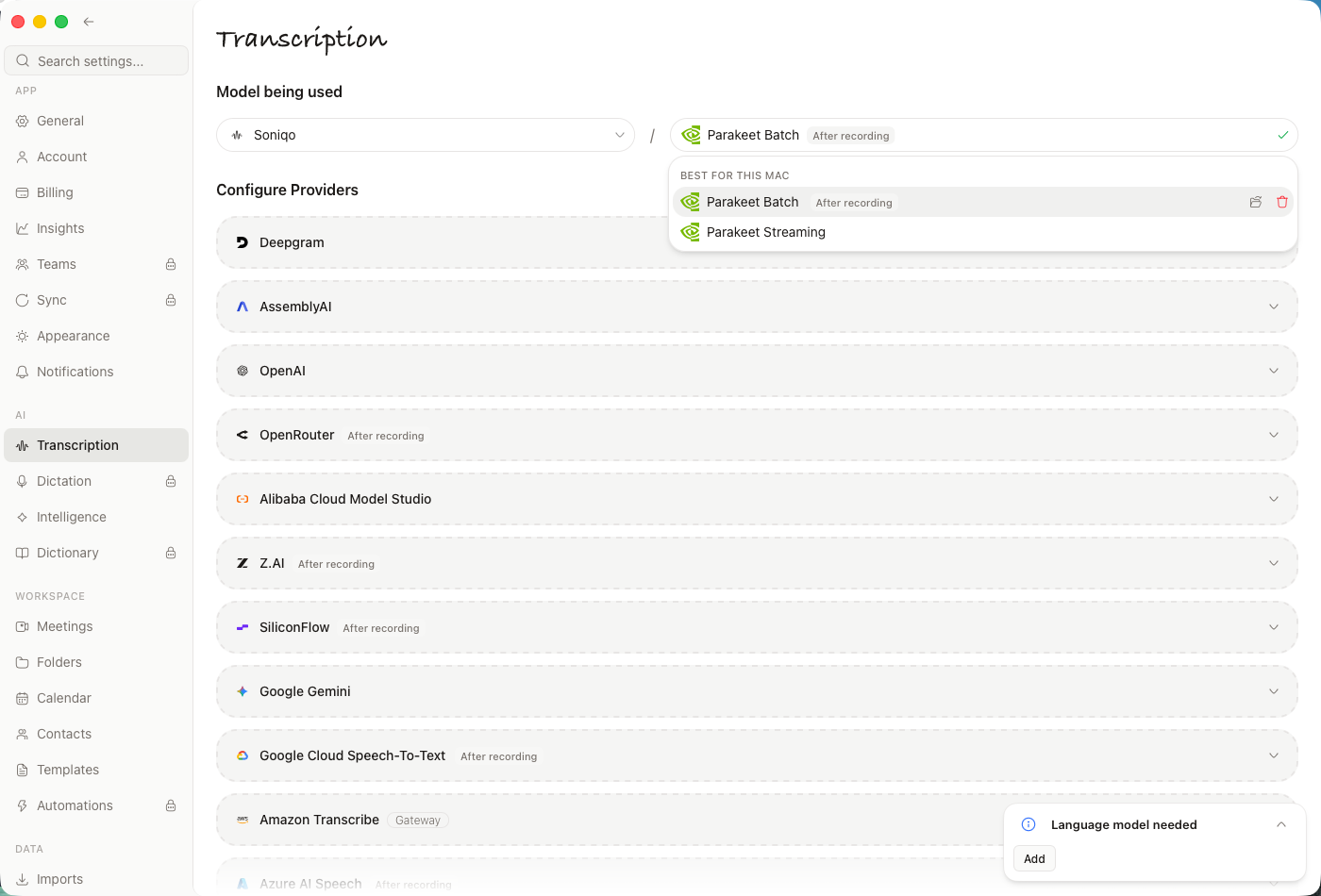
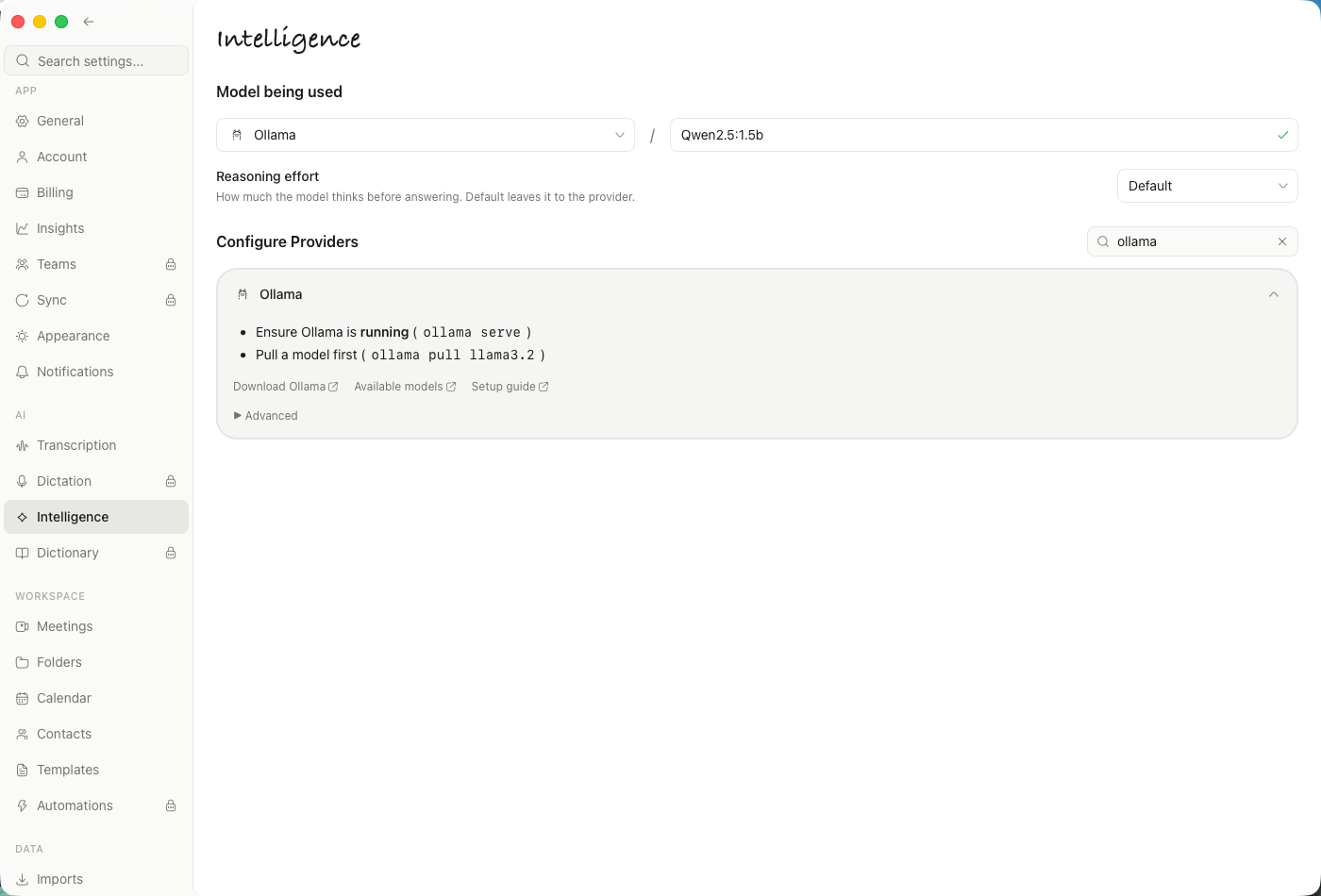
Open Settings → Transcription and choose an available local provider. Complete the model download before your offline session. Then open Settings → Intelligence and select your local summary model. Anarlog documents these as separate selections in Models and providers.
If you use Ollama, make sure the server is running and the chosen model is present. Verify that its endpoint is on the intended computer. An Ollama connection to a remote machine is not on-device processing, even if that remote machine is under your control.
A cloud transcription selection sends audio to a provider. A cloud Intelligence selection sends the text and context needed for the request. Turning only one of those selections local leaves a mixed workflow.
Test capture before testing AI
Use a short sample with no sensitive information. Speak into the microphone, and play a short authorized audio sample through the application whose output you intend to capture.
Listen to the recording before troubleshooting the transcript. If the other side of the conversation is absent from the audio, changing speech models will not restore it. Check the selected input/output devices and macOS microphone/system-audio permissions first.
Record the device setup you tested. A laptop microphone and speakers are not the same configuration as Bluetooth headphones or an external interface.
Disconnect and create a new sample
After preparing both models, disconnect the Mac from the network. Create a fresh recording rather than reopening a previously processed meeting. That avoids confusing cached results with a successful offline run.
Use this sample structure:
We approved the pilot for next Tuesday. Maya will prepare the checklist. We rejected the Friday launch. The support handoff still has no owner.
Check whether the transcript preserves the rejected launch and whether the summary leaves the unassigned task unassigned.
Keep a small result log:
| Check | Pass condition |
|---|---|
| New recording | The intended microphone and playback audio are present |
| New transcript | Text is generated while disconnected |
| New summary | It is generated using the selected local model |
| Meaning | Decision, rejected idea, owner, and missing owner remain distinct |
| Export | The result opens without a hosted workspace |
If a step fails, record which one. “Offline did not work” is much harder to diagnose than “capture succeeded, but the summary model was not downloaded.”
What we verified on an Apple Silicon Mac
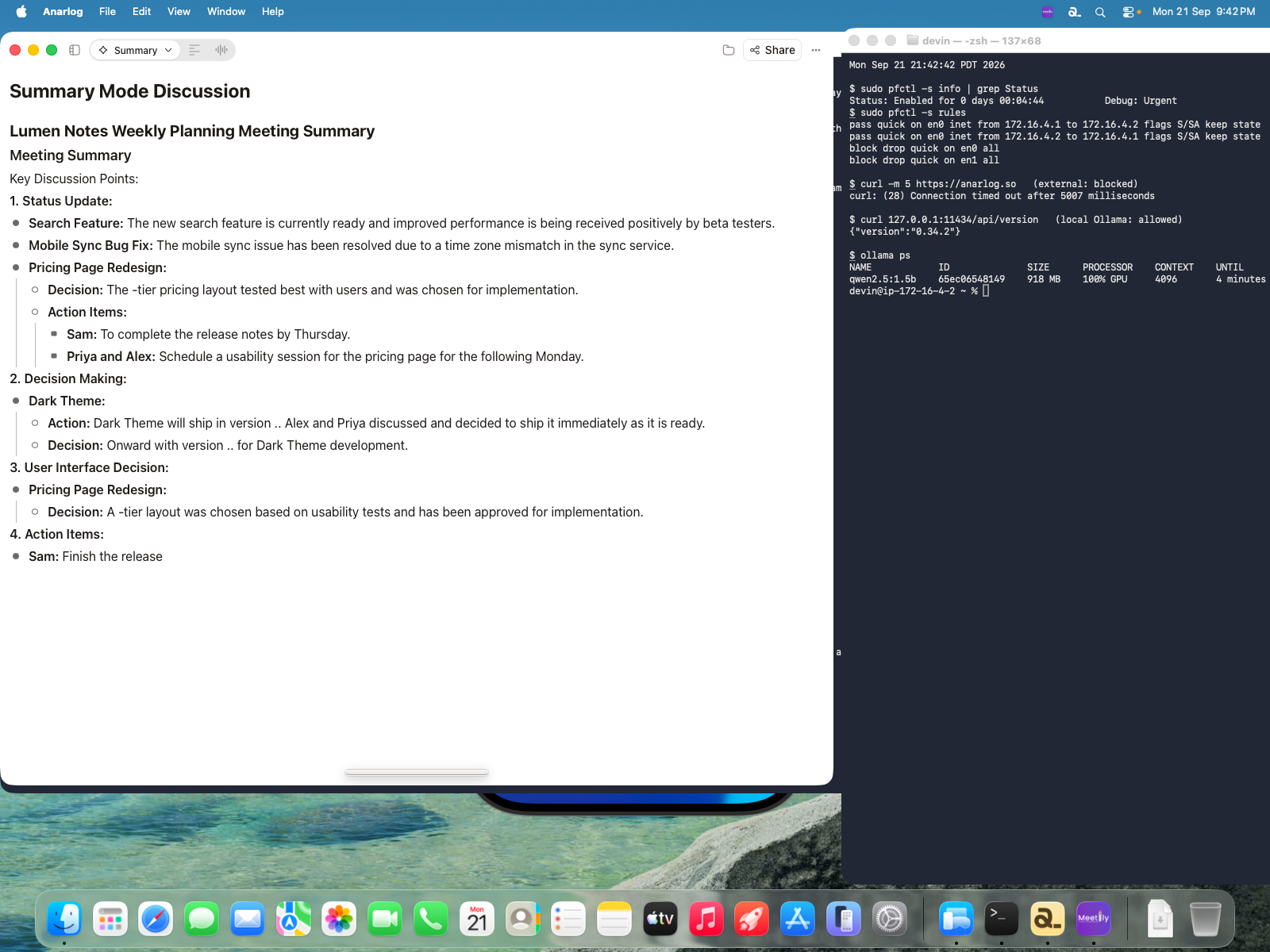
We tested Anarlog 1.4.25 on an Apple Silicon VM running macOS 26.5.2. Local Soniqo Parakeet handled speech; Ollama 0.34.2 with qwen2.5:1.5b handled the summary. The input was a 79.6-second synthetic planning conversation, with fictional people and decisions.
The VM had no Wi-Fi hardware or physical audio devices. We used BlackHole loopback for the live audio check and blocked external network traffic with the macOS packet filter while allowing the local Ollama endpoint. An external HTTPS request timed out; localhost:11434 remained reachable. This verifies that setup, not a laptop microphone or Bluetooth headset.
| Step | Observed result |
|---|---|
| MP3 import | The file imported and produced a local transcript |
| Live transcription with external traffic blocked | Fresh loopback audio produced text |
| Local summary with external traffic blocked | Completed in approximately 2–2.5 minutes |
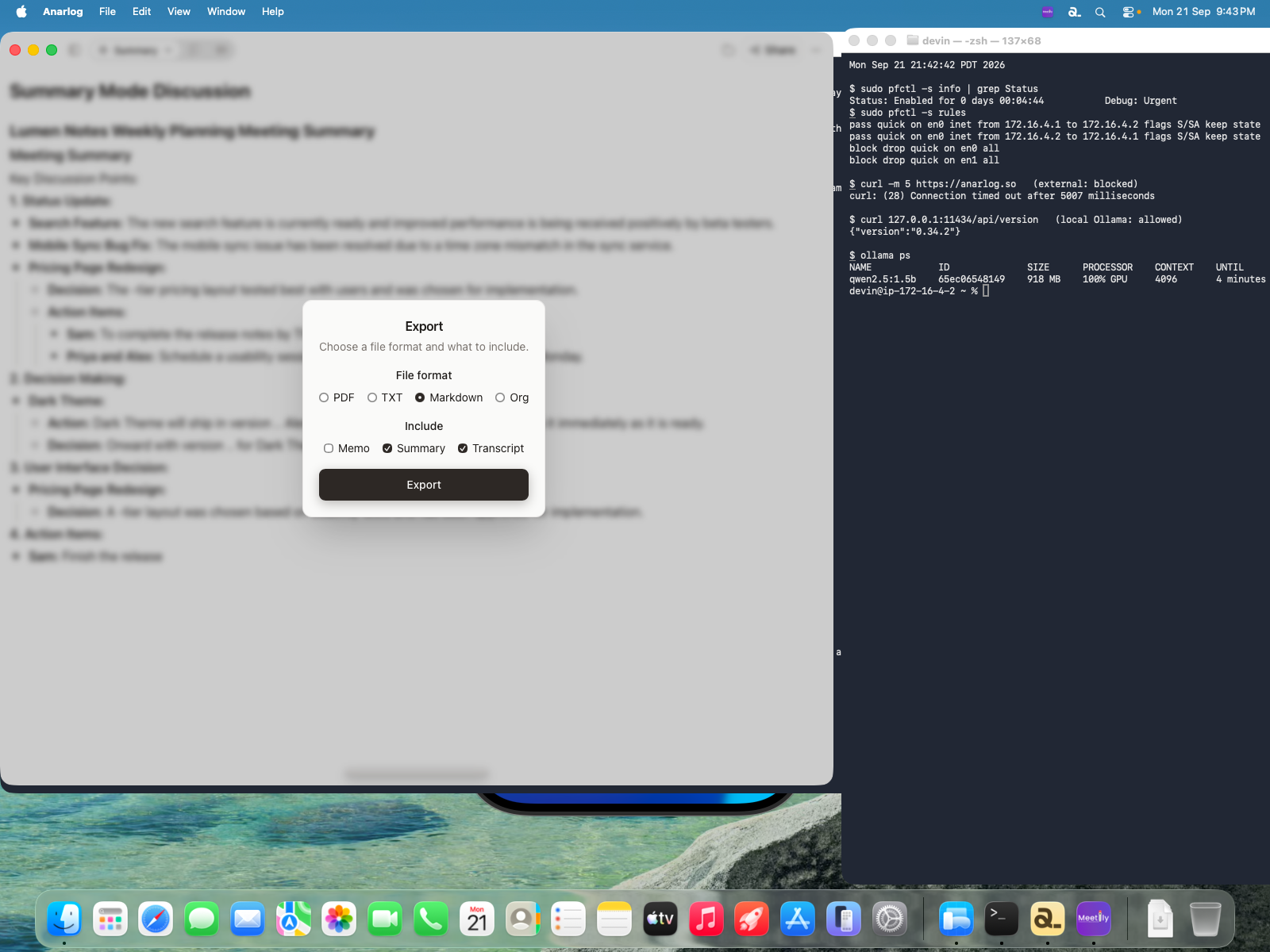
| Markdown export and reopen | Summary and transcript exported and opened in TextEdit |
| Accuracy check | Failed on some numbers, one owner assignment, and one deadline |
The workflow completed; the output still needed correction. The speech model dropped version and pricing-tier digits. The summary assigned a task to “Priya and Alex” for the following Monday, while the source assigned it to Priya for Tuesday. Review names, numbers, decisions, and deadlines against the recording before relying on the note. This short synthetic test does not establish long-meeting accuracy.
Common causes of a partly offline setup
Anarlog's offline guide explains the boundaries: hosted providers, web search, sharing, and sync depend on network paths. Existing local notes can remain accessible even when those features are unavailable.
For a local-only meeting workflow, leave network-dependent features out of the test. Also check whether your export folder is automatically synchronized by another application. A locally generated transcript can still leave the device when another service copies the file.
Before an hour-long call, test a representative recording while you still have time to adjust model memory, audio quality, or summary context.
Keep the working configuration
Save the Anarlog version, macOS version, chip, speech provider/model, summary provider/model, and audio-device setup. Repeat a short offline check after changing one of those components.
To follow the tested Apple Silicon route, choose the matching Mac build, then use the first-meeting guide. Complete both model downloads before disconnecting.
If you are still choosing a workflow, local AI meeting notes compares local and hosted approaches.