
Who can see a Fireflies recording depends on the meeting's sharing audience and workspace controls. Do not judge access by who received an email. Also check the separate Public Meeting Access setting, which affects how people without Fireflies accounts open public links.
Fireflies' recap permissions guide describes a broad default audience that includes teammates and people with the link. Its Public Meeting Access guide says guest access without signing in is disabled by default and is a Business/Enterprise feature. These are two different controls.
We make Anarlog. Documentation was checked September 22, 2026; images are vendor-provided. The access checklist is for you to run in your workspace. We did not test signed-in owner/viewer permissions or audit an Enterprise account.
Start with the meeting audience
| Audience option | People included by that choice | A practical use |
|---|---|---|
| Owner only | The meeting owner | A personal draft or restricted interview |
| Participants | Meeting attendees, potentially including external people | A customer follow-up |
| Teammates | Members of the Fireflies workspace | Internal knowledge sharing |
| Teammates and participants | Both sets of people | Mixed internal/external collaboration |
| Teammates and link holders | Workspace members plus link-based access | Material intended for wider distribution |
This is a reading aid for the documented audience options, not a substitute for checking additional invites, groups, and administrator policies. "Teammate" refers to workspace membership. It does not mean "was on this call."
For a sensitive meeting, choose a narrow audience deliberately. If you then add a specific collaborator, review that grant too. A restrictive default does not tell the whole story after individual invitations have been added.
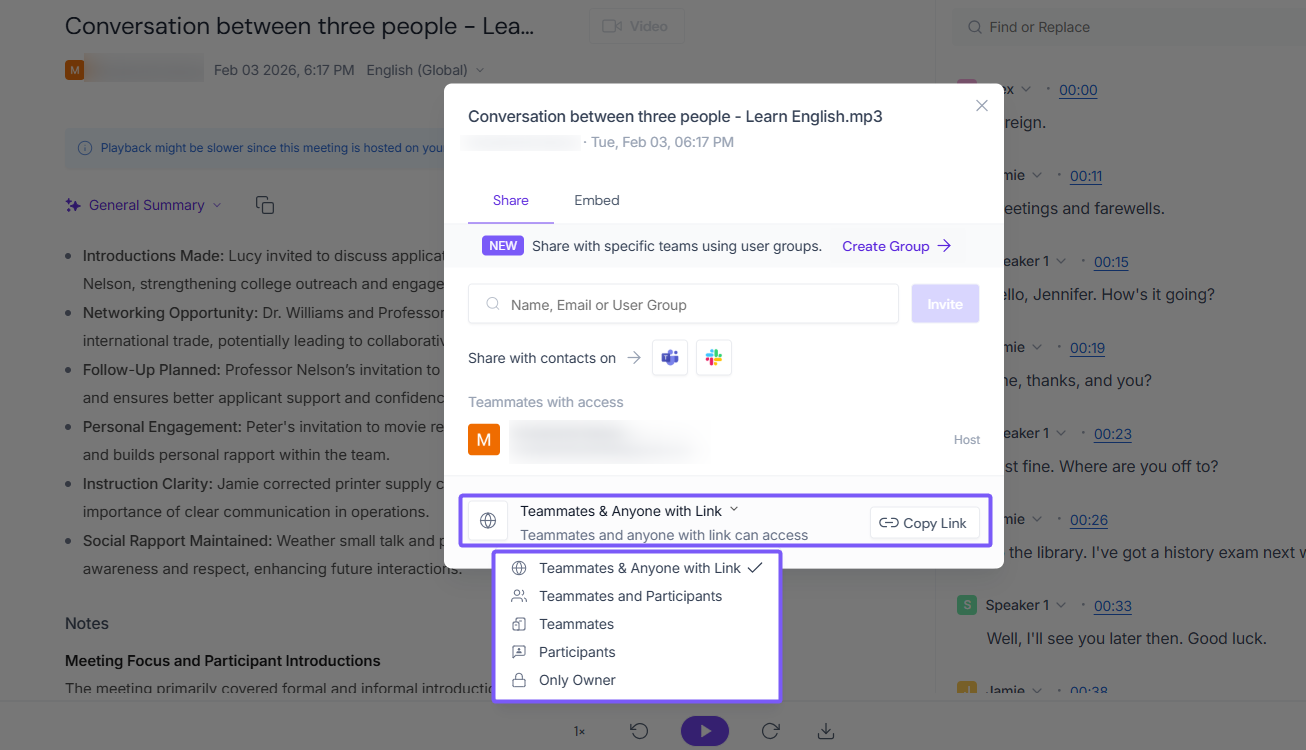
Source: Fireflies.
Public Meeting Access answers a different question
The Public Meeting Access switch determines whether a non-user can view a shared public recap without signing in. It does not replace the meeting's audience settings or control recap email delivery. Administrators can also govern the switch for their workspace. See the official guest-access guide.
A sign-in screen is therefore not sufficient evidence that a recap is private. Someone may sign in and still qualify under the selected audience. Equally, the existence of a share link does not prove that every visitor sees every part of a recap without authentication.
Treat access as a small matrix: which person, using which account, following which link, can see which content?
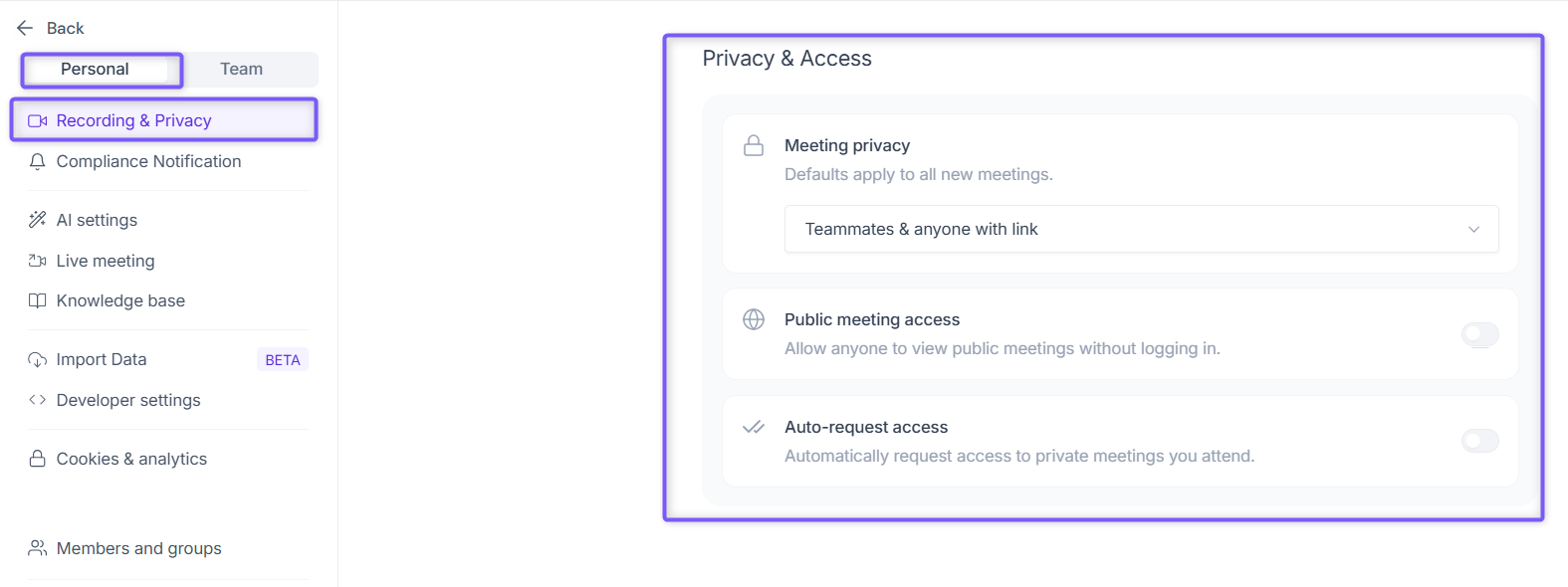
Source: Fireflies.
Change the default and review existing meetings
Open Settings → Personal → Recording & Privacy → Privacy & Access and choose the audience for future recaps. Fireflies documents a prompt that lets a changed preference apply to future meetings or to past meetings you hosted. Read that choice carefully; changing a default and changing historical access are different actions. Source: privacy settings.
For one existing recap, open the meeting from the feed or Notebook, select Share in its top-right corner, and choose the audience. Review the Specific People and user-group grants in the same sharing flow. Fireflies has a separate guide to sharing with selected people. Use direct grants when the intended audience is two colleagues rather than an entire workspace.
If your organization uses automatic rules, also inspect its Rules Engine configuration. Do not assume a personal setting is the only source of behavior in an administered workspace.
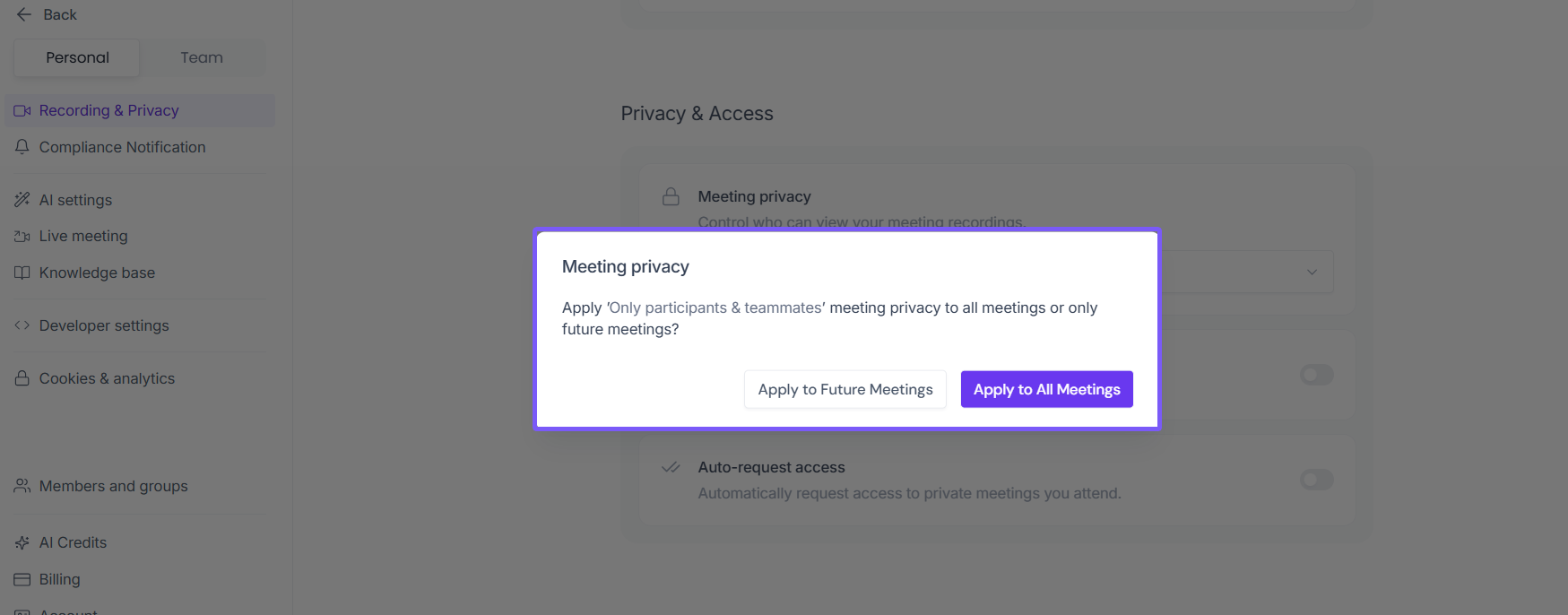
Source: Fireflies.
Run an access check with a synthetic meeting
Use a sample with no customer or employee information. You do not need a real confidential meeting to test permissions.
| Viewer | Test | Result to record |
|---|---|---|
| Owner | Open the recap normally | Expected owner access |
| Teammate who did not attend | Open the same recap link | Allowed or denied, and visible content |
| External participant | Open using their own account | Whether participant access works as intended |
| Signed-out guest | Open in a separate browser session | Sign-in requirement and any visible preview |
Use authorized test accounts for these checks. Record transcript, summary, and audio availability separately. Do not mistake a cached owner session for a guest test.
Then change the audience and repeat the relevant check. A successful setting change is useful evidence; an actual denied request from the excluded test account is stronger evidence of the intended result.
Review copies outside the recap
A recap email can contain information independently of access to the full meeting. Exported files, copied notes, and connected destinations can also persist after you tighten the original link. Review where information was sent before assuming one permission change has recalled it.
Fireflies provides a hosted collaboration workflow. If you prefer to keep the canonical meeting record on your computer and choose each distribution step, Anarlog offers local SQLite storage and portable exports. Optional sharing and cloud AI still require their own configuration review.
For a broader assessment of the service, see our Fireflies safety guide. For this task, the useful outcome is a verified audience for your next meeting and a deliberate decision about access to past ones.