
Fireflies says its standard service stores and processes data in US cloud infrastructure using AWS and GCP. Its Enterprise Private Storage option changes storage arrangements, but you should verify processing separately. Fireflies' storage guide explicitly describes an EU-storage arrangement that still processes data in the US. Source: storage and transfer guide.
The practical question is not just which country contains a file. It is which services receive the recording, transcript, and summary, how long each keeps them, and who can open the resulting recap.
This guide reviews public documentation as of September 22, 2026. We make Anarlog. We did not provision a Fireflies Enterprise environment or inspect its infrastructure.
Follow each kind of meeting data
| Data | Storage location and scope | Processing | Retention owner / rule |
|---|---|---|---|
| Audio and video | US by default; explicitly included in Enterprise Private Storage | Fireflies describes US processing even with a regional bucket | Meeting/workspace controls; external vendors have a separate no-retention commitment |
| Transcript | US by default; explicitly included in Private Storage | US processing in the documented arrangements | Meeting/workspace controls; exporting creates an independently managed copy |
| Summary | Stored as user content in the standard service; Private Storage's public artifact list does not separately confirm summary placement | AI/subprocessor path; confirm the contracted arrangement | Fireflies workspace retention is distinct from the AI vendor's retention |
| Account details and metadata | A per-field region map is not published in the sources reviewed | Service providers depend on the function, such as billing or support | Account-related personal data follows the active-account/closure policy; other personal data has purpose-based retention |
Sources: the storage and transfer guide, the September 13 Private Storage explanation, and the privacy policy. An unconfirmed cell is a documentation gap, not evidence that the data is stored in an unexpected place.
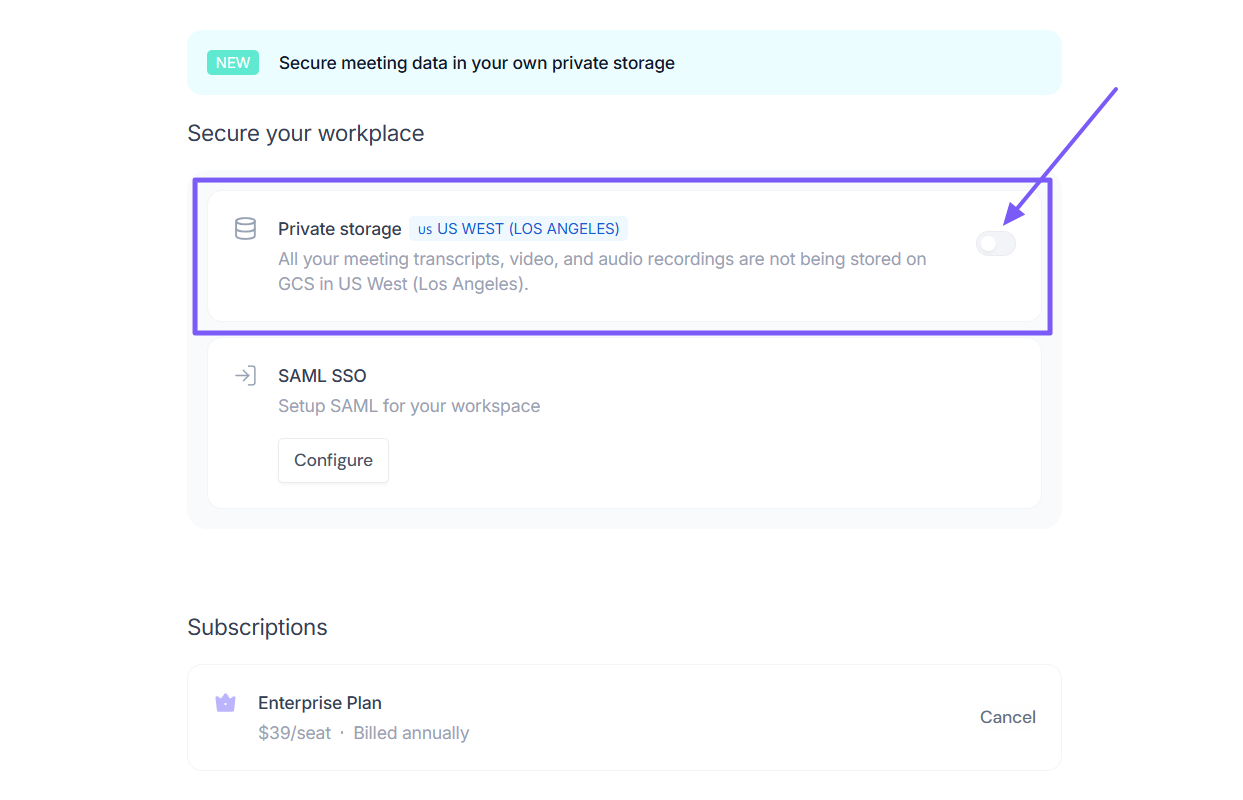
The storage guide names AWS and GCP in the standard US environment. Private Storage can be managed by Fireflies or use your own supported bucket. Neither option should be read as a promise that the entire processing pipeline has moved into that bucket.
What Private Storage changes
Private Storage is an Enterprise option. Read the Private Storage description with the applicable order form before treating it as a regional guarantee.
Ask for a concrete example: a meeting is recorded, transcribed, summarized, shared, and then deleted. For each step, identify the service handling the content. A diagram that ends at your storage bucket can leave out the transcription and summary services that ran earlier.
For a European team, the useful question is: "For this configuration, which content is processed outside our selected region, and under which contractual terms?" A European storage location alone does not answer that. This article is a technical reading guide, not a determination that a particular deployment satisfies a legal obligation.
Source: Fireflies.
Why zero retention does not mean an empty workspace
Fireflies' information-safety policy describes restrictions on third-party vendors keeping meeting content after processing and using it for training. That is a different layer from Fireflies keeping a recap available to you.
Consider a simple example. A model provider receives a transcript, returns a summary, and keeps no copy after the request. Fireflies can still store the transcript and summary so your team can search them next week. Those two behaviors are compatible.
You therefore need separate answers to three questions:
- Does the AI processor keep the request after processing?
- How long does the meeting application retain the recording and outputs?
- Have people or integrations created additional copies?
"Not used for training" answers another question again. It does not, by itself, set a deletion deadline.
Retention and deletion controls
Fireflies' account policy says account-related personal information is retained while the account is active and deleted within 30 days after closure. Other personal information can be retained for the service's stated purposes. This is not a 30-day automatic expiry for every meeting.
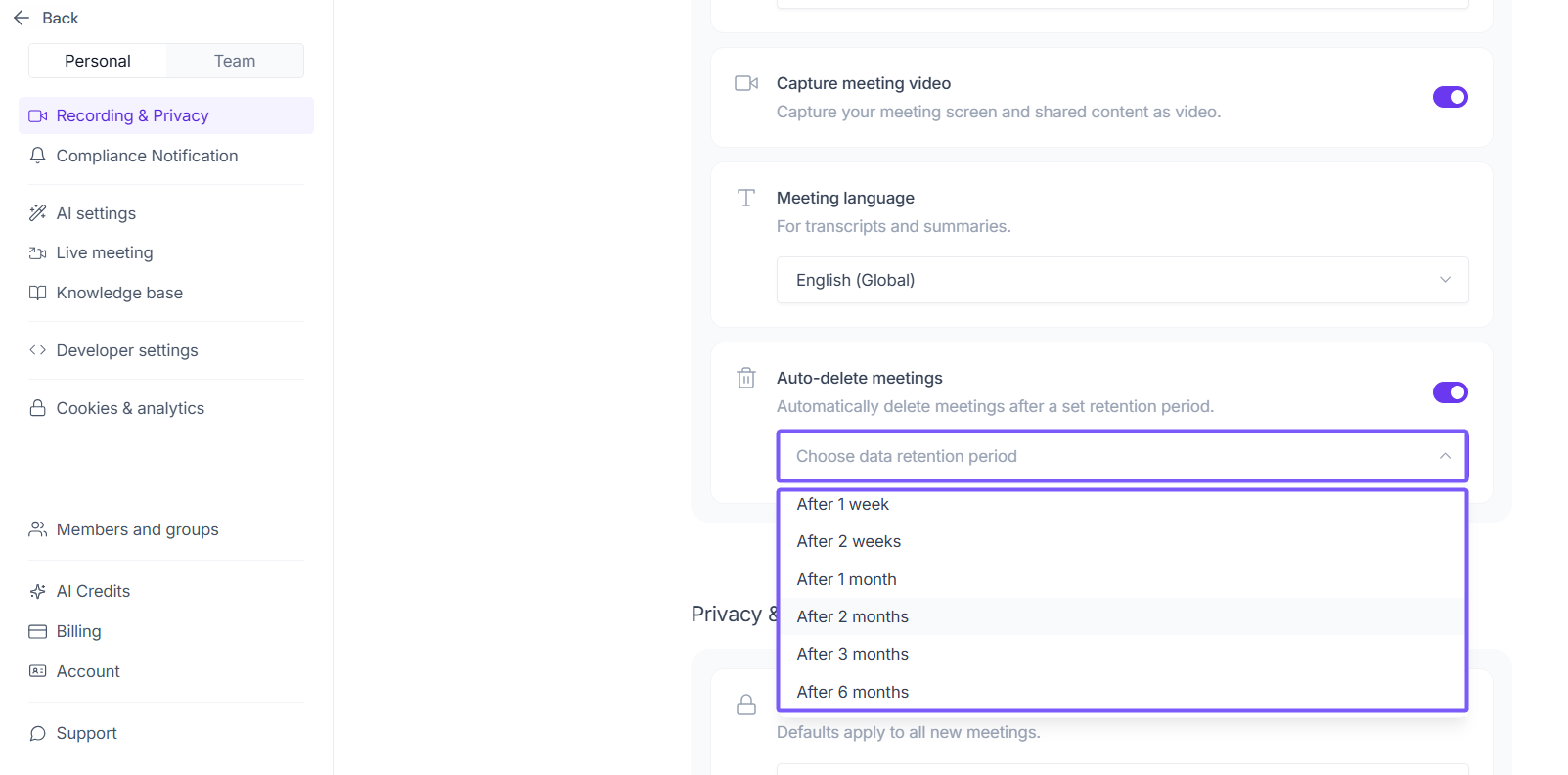
Enterprise auto-delete: open Settings → Personal → Recording & Privacy → Auto-delete meetings, enable it, and choose a period from one week to one year. The meeting owner's setting controls the meeting. The auto-delete guide says this applies to future meetings, not existing history.
An administrator can use Settings → Team → Recording & Privacy → Auto-delete meetings to set a workspace period or allow individual choice. This is an Enterprise entitlement; do not promise it on every paid tier.
For an existing recording, distinguish deleting the meeting, closing the account, and deleting an exported copy. The public sources reviewed do not establish one universal purge deadline covering every backup and derivative after an individual meeting deletion. Obtain that answer for the configuration if your policy requires it.
Use a synthetic record to confirm which controls are available in your account. Keep the owner, chosen retention period, and whether the rule affects future or existing meetings with the result. Review exports and integrations separately; deletion of a source object does not by itself prove that a receiving system deleted its copy.
Source: Fireflies.
When local processing fits better
Fireflies' hosted workspace can be useful when centrally shared meeting history is the goal. If your requirement is to keep meeting processing on a computer you control, compare that architecture directly with a local setup.
Anarlog stores canonical meeting data in local SQLite. To keep AI processing local too, you must select local transcription and local summary models and prepare them before disconnecting. Managed AI, external API keys, sharing, and sync have their own data paths. The offline setup documentation makes those boundaries explicit.
For the broader product assessment, see Is Fireflies AI safe?. The decision here is narrower: obtain a storage answer, a processing answer, and a retention answer for the configuration you will actually use.